Microsoft 365
Microsoft 365 support and admin, worked by AI
Users ask in Teams; the AI checks their account, licenses, mailbox and Microsoft’s service status, then creates, changes or offboards accounts with the approval you require. Each client’s tenant stays separate.
Microsoft 365 support from the ticket
Users ask in Teams, Outlook or email when they cannot sign in, a license is missing or mail stops arriving. The AI checks their account, licenses and mailbox, and whether Microsoft has an outage, while they wait.
Many answers come back in the same conversation. When a person is needed, your technician gets the ticket with what the AI found.
Microsoft 365 admin without the admin center
Password resets, blocked sign-ins, user details, groups, shared mailboxes and mail forwarding become actions on the ticket, run with the approval you require.
Your technicians stay out of the admin center for routine work, and every change is written on the ticket.
Onboarding and offboarding
A new hire’s account, licenses, groups and shared mailboxes are ready on their start date, copied from a colleague in the same role if you like.
When someone leaves, sign-in is blocked, their mail is kept in a shared mailbox and their licenses are freed for the next hire.
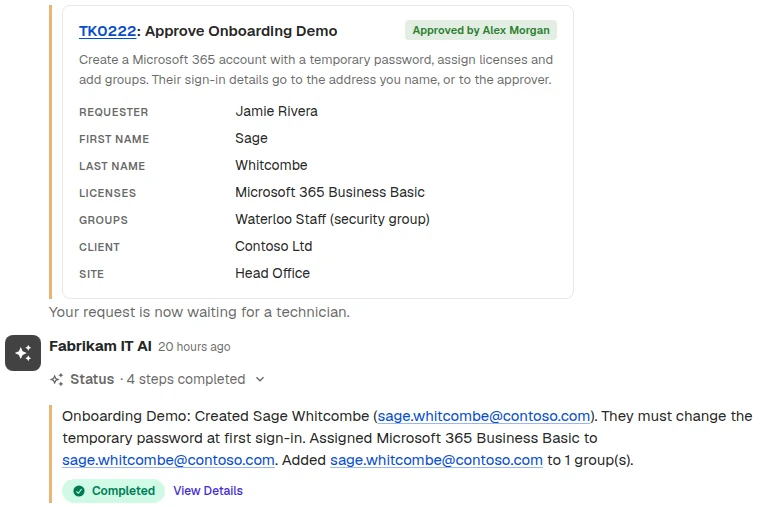
Licenses and seats
Assign and remove licenses from the ticket. When no seat is free, IT support is asked to add one before the license is assigned.
For clients whose licenses you buy through Pax8, the missing seat is bought once IT support approves.
For MSPs and internal IT
MSPs connect each client’s Microsoft 365 tenant once; that client’s users, changes and approvals stay with that client.
Internal IT connects the company’s own tenant, and employees get help in Teams from day one.
Safety and security
Account changes happen only with the approval you require, and checks never change anything.
Approval on every change
Account and license changes wait for the client’s admin or IT support by default.
Checks change nothing
Looking at an account, its licenses or its mail never changes it.
One tenant at a time
Each client’s tenant, users and changes stay with that client.
Everything on the record
Each change, and who approved it, is written on the ticket.
Questions about Microsoft 365
Yes. After the approval you require, the temporary password goes to the approver as a one-time link.
A Microsoft admin approves one connection for the tenant. Teams, email, user sync and the account actions all work from it.
It becomes a shared mailbox, so the mail stays available, before the licenses are removed.
Yes, through Pax8 for clients whose licenses you buy there, once IT support approves.
Google Workspace accounts can be checked on tickets too. The account changes on this page are for Microsoft 365.
Yes. It is part of the US$100 per technician monthly subscription.