Monitoring and alerts
AI monitoring and alerts for servers and devices
Built-in rules watch disk, CPU, memory, services and server roles on Windows, Mac and Linux from day one. Real problems become one ticket per client and site with the numbers that matter, and close themselves when things are back to normal.
Server and workstation monitoring
NetZen watches disk space and health, CPU, memory, services, processes, uptime, pending restarts and offline time on Windows, Mac and Linux devices.
Sensible rules are on from the first day. Change any limit, apply a rule to some clients or sites, or add your own for a service or process.
Network problems, checked from inside the site
When a ticket points beyond the computer, the AI checks the site’s internet line, router, Wi-Fi, DNS and shared devices such as printers, from a device at that site.
It only looks, and every check it ran is listed on the ticket.
Alerts that become tickets
A real problem opens one ticket per client and site, written in plain language with the numbers that matter, and closes itself when everything is back to normal.
A stopped service can be restarted automatically, alerts stay quiet during maintenance and patch windows, and the AI investigates an alert ticket when your team asks.
Your other monitoring tools can send their alerts in too, and each opens a ticket for the right client or joins the open ticket for the same problem.
Domain controllers, Hyper-V and backups
NetZen recognises server roles and checks what matters on each: Active Directory replication and services, Hyper-V virtual machines and checkpoints, DNS, DHCP, IIS, SQL Server and Windows Server Backup.
Those checks are on from the start, so a failed backup or a stopped virtual machine shows up without anyone writing a rule.
Security and compliance alerts
Alerts from Bitdefender, Huntress, ThreatDown and Acronis open tickets alongside your monitoring, grouped so one problem is one ticket.
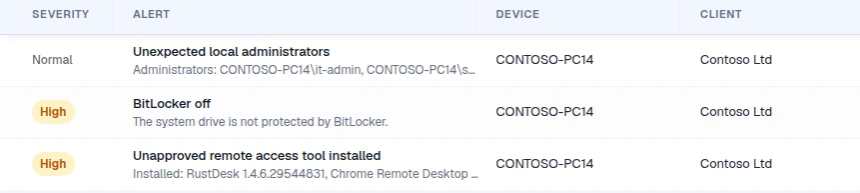
Compliance checks flag missing antivirus, unsupported software and unapproved remote access tools, and failures can open tickets.
For MSPs and internal IT
MSPs give a client its own limits by narrowing a rule to that client, and every alert ticket lands under the right client and site.
Internal IT teams watch the company’s servers and laptops from the same help desk employees use.
Safety and security
Monitoring follows the rules you set, and nothing on a device changes unless you turned it on.
Rules you choose
Change any limit, narrow a rule to some clients or sites, or add your own.
Quiet when you say
Pause alerts for maintenance; patch windows pause them automatically.
Changes only where allowed
A stopped service is restarted only where you turned that on.
Every alert kept
Each alert stays on the dashboard for 90 days, linked from its ticket.
Questions about monitoring
Windows, Mac and Linux computers and servers with the NetZen agent. A site’s network is checked from inside the site when a ticket needs it.
No. NetZen’s rules are on from the start; change limits or add rules when you need to.
No. Alerts for the same problem share one ticket per client and site, and new alert tickets are capped each hour.
Yes. Each alert can be sent to a webhook when it fires and when it resolves.
Yes. A monitoring tool can post its alerts to a NetZen webhook; each opens a ticket for the chosen client and site, or joins the open ticket for the same problem.
It restarts a stopped service where you turned that on. For anything else, ask the AI on the alert ticket and it investigates, with your approvals.
Yes. It is part of the US$100 per technician monthly subscription, with no charge per device.